Category: Update
SPSLogger V0.2.1.0 available
8. August 2026
An update for SPSLogger is available.
Version 0.2.1.0 contains the following improvements:
New: Focus log rows
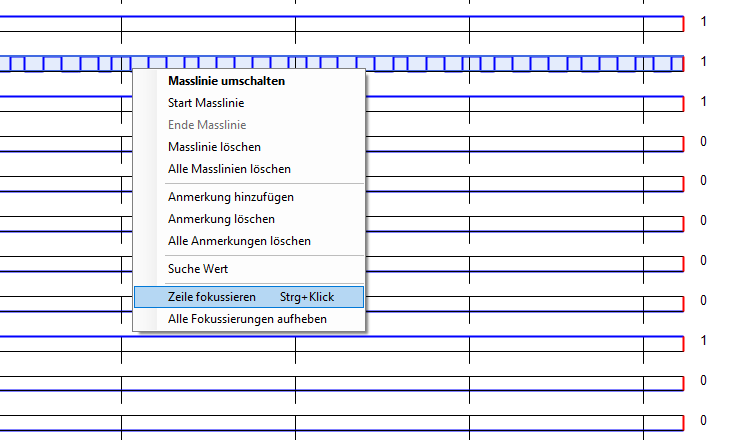
When watching several signals at once, it can be hard to keep track of one or more specific rows in the chart. A new focus feature helps with this:
- Ctrl+Click on a row’s chart area toggles its focus.
- The chart’s right-click context menu also offers Focus Row and Clear All Focus.
Focused rows get a gray highlight; all other rows stay unchanged. Multiple rows can be focused at the same time. Focus is a display-only state and is not saved in the configuration file.
New: OPC-UA connection
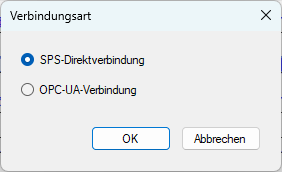
SPSLogger can now connect to the controller in two ways:
- SPS-direct – as before, via libnodave (S7 protocol, MPI/DP/Ethernet).
- OPC-UA – new, via an OPC-UA server (e.g. the PLC’s built-in OPC-UA server).
Use Settings → Connection type… to choose which of the two is active. The choice is stored in the configuration file and shown in the status bar. Switching is only possible while disconnected. Settings → Connection settings… automatically opens the matching dialog (SPS or OPC-UA settings) for whichever mode is active.
Note: OPC-UA support is experimental and not yet fully tested. Please use with care and report any issues to the author.
Other improvements
- New Ctrl+E shortcut to open the edit dialog for a log row directly.
- Drag-and-drop row reordering in the log-row dialog is now possible.
- The status bar shows the active protocol type.
Bug fixes
- Copy/cut/paste (Ctrl+C/X/V) in the log-row dialog could occasionally throw a “clipboard cannot be opened” error; fixed.
- Pasting into a single cell in the log-row dialog sometimes wrote into the wrong column (“Description” instead of “Format”); fixed.
- Invalid log rows removed during cleanup could reappear the next time the view was rebuilt; fixed.
- Browsing historical data while a real-time recording was running could show the wrong (too far away) value at the right edge of the chart; fixed.
- Determining the most recent database timestamp happened to return the correct result due to a coding mistake; the calculation is now implemented correctly.
- Various smaller internal fixes (database access, server function, resource cleanup) as part of a broader internal code review.
Hinweis:
The update can be performed via the “Help” → “Check for Updates” menu item. Alternatively, you can download it directly from the page https://spslog.ch/en/download/